
You collect rent every month. Maybe you jot it down in a notebook. Maybe you keep it all in your head. And then… one day a tenant says they already paid. You say they didn’t. Nobody has proof. Now you have a real problem.
This is where a rent ledger saves you. It is a simple record of every payment your tenant makes. Every rupee. Every date. Every balance. And it takes less than five minutes a month to maintain.
In this guide, you will learn exactly what a rent ledger is, what it should include, and how to use one properly. You will also find free templates you can download right now in Excel, PDF, and Google Sheets formats.
What is a Rent Ledger?
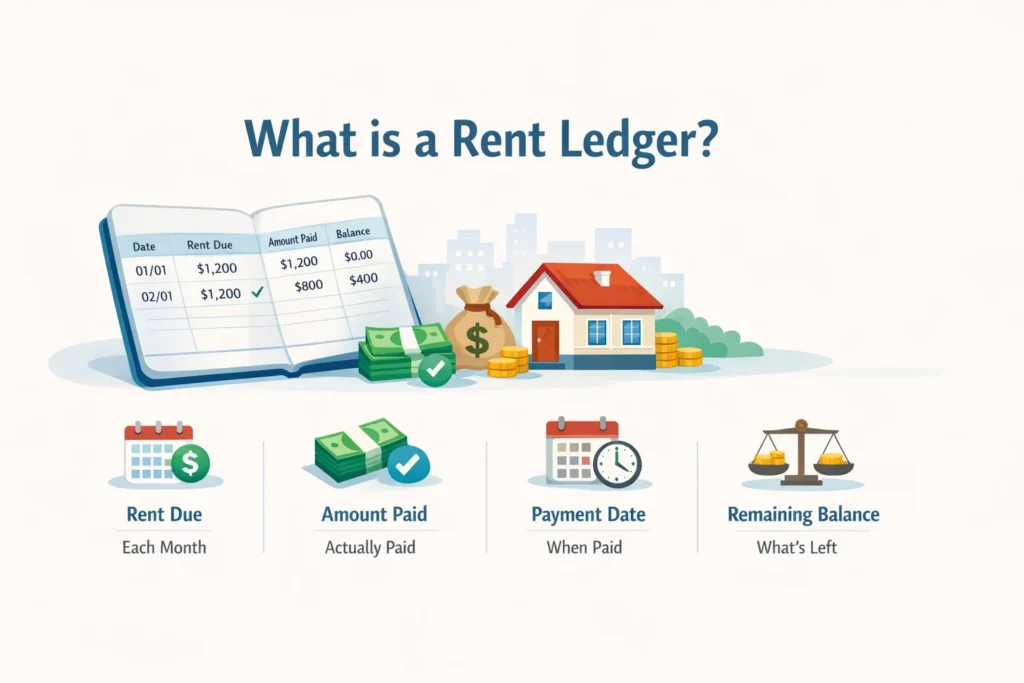
Think of a rent ledger like a bank passbook. But instead of your savings, it records rent transactions between you and your tenant.
A rent ledger is a written record that tracks:
- How much rent is due each month
- How much was actually paid
- When the payment was made
- What balance is left (if any)
That is it. Simple. Clean. But incredibly useful when things get complicated.
Landlords use it. Property managers use it. Even tenants sometimes keep their own copy as proof of payment. It is not a legal contract. But it is a detailed payment history that both sides can rely on when memories get fuzzy.
What is a Tenant Ledger or Rental Ledger?
You might hear these terms used differently depending on who you talk to. But they all mean the same thing.
- Tenant ledger: A record maintained per tenant, tracking their individual payment history
- Rental ledger: A broader record, sometimes covering all tenants across a property
- Lease ledger: Often used in commercial properties, tied specifically to the lease term
- Payment ledger: A general term for any income and payment record
Whether you manage one flat or ten properties, the concept stays the same. Track who paid, how much, and when.
Why is a Rent Ledger Important?
Here is a simple question. If a tenant disputes a payment from six months ago, can you prove what happened?
Without a rent ledger, the honest answer is probably no.
Here is why every landlord needs one:
- Payment tracking: You know exactly who has paid and who has not, without guessing or checking your bank statement line by line
- Legal proof: Courts and legal proceedings accept documented payment records as evidence
- Dispute resolution: When a tenant says they paid and you say they didn’t, the ledger settles it fast
- Tax filing: Rental income needs to be declared. Your ledger is your income record
- Late fee calculation: You can see exactly when payments were delayed and by how many days
- Financial planning: Know your monthly cash flow at a glance, without adding things up from scratch
I once spoke to a landlord who had rented out a flat for three years with no records at all. When the tenant left and disputed two months of rent, there was no way to prove what had happened. The dispute dragged on for weeks. A simple ledger would have settled it in minutes.
What Does a Rent Ledger Include?
A good rent ledger is not complicated. You do not need accounting software or a finance degree. You just need these key fields:
| Field | What to Enter |
|---|---|
| Tenant Name | Full name of the tenant |
| Property Address | Full address of the rented property |
| Month / Period | The month this record covers (e.g., April 2025) |
| Rent Due | The total rent amount agreed in the lease |
| Rent Paid | The actual amount received from the tenant |
| Payment Date | The date the payment was received |
| Balance | Any outstanding amount (Rent Due minus Rent Paid) |
| Mode of Payment | Cash, bank transfer, UPI, cheque, etc. |
| Late Fee (if any) | Any penalty for delayed payment |
| Notes | Partial payments, advance adjustments, any remarks |
You do not need all of these if your situation is simple. But the more complete your record, the better protected you are.
Rent Ledger Example (Sample)
Here is what a filled-in rent ledger looks like for a single tenant over three months:
| Month | Rent Due | Paid | Date Paid | Late Fee | Balance | Notes |
|---|---|---|---|---|---|---|
| January 2025 | Rs. 15,000 | Rs. 15,000 | 03 Jan 2025 | Nil | Rs. 0 | On time |
| February 2025 | Rs. 15,000 | Rs. 10,000 | 12 Feb 2025 | Rs. 500 | Rs. 5,000 | Partial payment |
| March 2025 | Rs. 15,000 | Rs. 20,000 | 05 Mar 2025 | Nil | Rs. 0 | Includes Feb balance |
You can see exactly what happened in February at a glance. The tenant paid short. A late fee was applied. And in March, they cleared the balance along with the current month’s rent. No confusion. No arguments.
Types of Rent Ledger Formats
There is no single correct format. The right one depends on your situation.
- Monthly rent ledger: One row per month, ideal for single-tenant tracking
- Yearly ledger: All twelve months on one sheet, great for annual review
- Apartment ledger: Tracks multiple units in one building together
- Lease ledger: Tied to a specific lease period, used more in commercial rentals
- Multi-property ledger: Separate sheets per property, with a master summary tab
For most individual landlords managing one or two properties, a simple monthly format works perfectly. If you are managing ten or more units, a multi-sheet Excel file will save you significant time and headaches.
Free Rent Ledger Templates (Download)
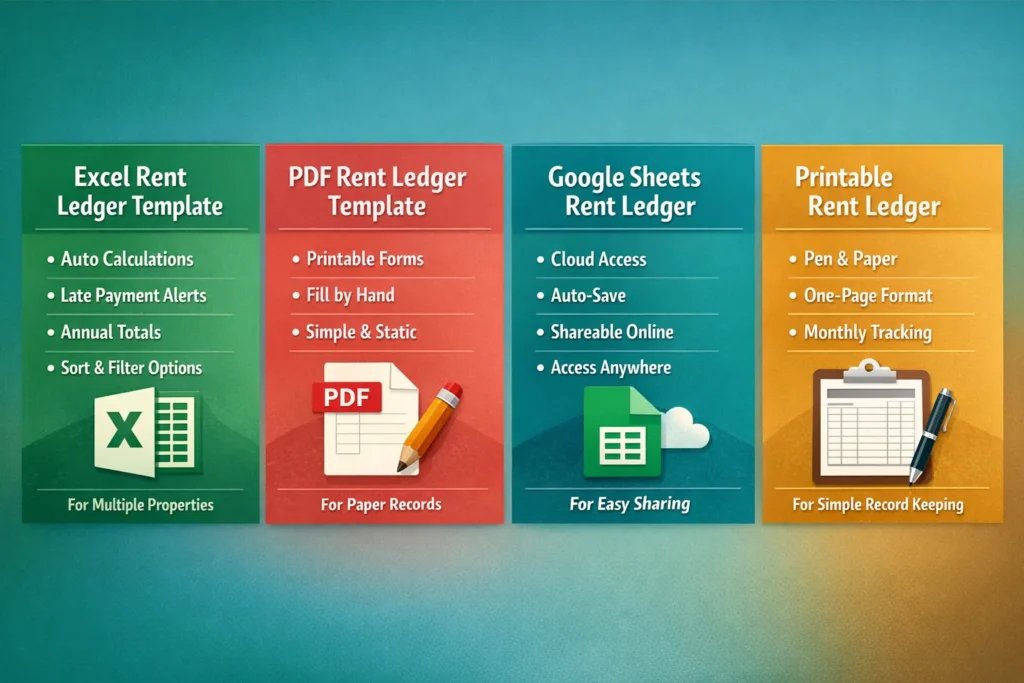
You do not need to build one from scratch. Below are three ready-to-use formats. Pick the one that matches how you work.
Excel Rent Ledger Template
Excel is the most powerful option. A well-built Excel template will:
- Auto-calculate your balance column
- Flag late payments if you set a due date
- Add up annual totals automatically
- Let you filter or sort by tenant, month, or property
Best for: Landlords with multiple tenants or properties who want automatic calculations and clean, organized records.
PDF Rent Ledger Template
Sometimes you just want something clean to print. A PDF ledger is perfect for landlords who prefer paper records or need to hand a copy to a tenant.
It is static. You fill it in by hand or type into the fields. No formulas. No tech skills needed.
Best for: Small landlords managing one or two properties who prefer physical record keeping.
Google Sheets Rent Ledger Template
Google Sheets is like Excel but lives in your browser. Your data saves automatically. You can access it from your phone, laptop, or tablet from anywhere.
You can also share it with a co-owner or property manager without emailing files back and forth.
Best for: Landlords who want cloud access, easy sharing, and free auto-save without installing any software.
Printable Rent Ledger Template
If you prefer pen and paper, the printable version is ideal. It is a clean, one-page format with rows for each month. Print a fresh copy for each tenant at the start of every year.
Keep it in a folder alongside the lease agreement. Simple. Organized. Done.
How to Use a Rent Ledger (Step-by-Step)
Using a rent ledger is straightforward. Here is exactly what to do:
- Enter tenant details at the top: Name, property address, lease start date, and monthly rent amount
- Set up one row per month: Label each row with the billing month
- Fill in rent due: This stays the same every month unless the lease has been revised
- Record payment when it arrives: Enter the date received, amount paid, and payment method
- Calculate the balance: Subtract paid from due. If it is zero, great. If not, carry it forward to next month
- Add late fees: If payment came after the due date, note the late fee in the appropriate column
- Write notes for anything unusual: Partial payment, advance deducted, anything out of the ordinary goes here
That is your entire monthly task. Five minutes. Maybe less. And your records are complete and current.
How to Maintain Rental Payment History Properly
A rent ledger only helps you if you actually update it. Here are some habits that keep records clean and reliable:
- Update within 24 hours of receiving payment: Do not wait until month-end to enter everything at once. Your memory is not as reliable as you think
- Use the same format every time: Consistency makes records easy to read and compare across months
- Keep a backup: If you use Excel, save a copy to Google Drive or email it to yourself monthly
- Never delete old entries: If a mistake was made, add a correction note rather than erasing the row
- Review at month-end: Five minutes on the last day of the month catches any missing entries before they become a problem
A ledger with gaps is almost as bad as no ledger at all. The habit of updating it regularly is what makes it genuinely valuable.
Rent Ledger for Multiple Properties
If you own more than one rental property, the approach is the same but the structure needs to be a bit smarter.
Here is a system that works well:
- One spreadsheet file per property: Name the file by the property address so it is easy to find
- One sheet per tenant: If a property has three units, create three tabs inside the same file
- A summary sheet: Add a master tab that pulls total income from each property into one overview
This way, you can check the status of any tenant in seconds. And at the end of the month, your summary sheet shows your total rental income across all properties without any manual adding up.
Adding Late Fees and Penalties in Rent Ledger
Late payments are a reality of being a landlord. Your rent ledger should track them clearly so there is no ambiguity about what is owed.
How to handle late fees in your ledger:
- Add a dedicated late fee column: Keep it separate from rent due and rent paid so the numbers stay clean
- Set a consistent policy: For example, Rs. 500 per day after the 5th of the month. Write this policy in your lease agreement
- Calculate based on days late: If rent is due on the 1st and paid on the 10th, that is 9 days. Apply your formula consistently
- Note it clearly: In the notes column, write something like: “Late by 9 days. Late fee of Rs. 4,500 applied”
In Excel, you can automate this completely. A simple formula can check whether the payment date falls after your due date and calculate the penalty automatically. This removes human error entirely and saves you from uncomfortable manual conversations with tenants.
Rent Ledger for Legal and Tax Purposes
Your rent ledger is more than a personal tracking tool. It serves real legal and financial purposes.
- Proof of payment history: If a tenant claims they paid rent for months you have no record of, your ledger is your primary evidence
- Rental income documentation: When filing income tax, you need to declare rental income accurately. Your ledger gives you the exact monthly figures
- Audit support: If tax authorities question your rental income, a complete ledger with dates and amounts is clean, credible documentation
- Eviction proceedings: Courts regularly ask for proof of unpaid rent. A well-maintained ledger is accepted as supporting documentary evidence
One important note. A rent ledger alone is not a substitute for formal receipts. Always issue a written rent receipt when payment is received. The ledger and the receipt together give you complete, layered protection.
Using Rent Ledger for Tenant Disputes
Disputes happen. Even with good tenants. When they do, having a rent ledger makes resolution much faster and far less stressful.
Common scenarios where a rent ledger helps:
- Tenant claims they already paid: Your ledger shows the exact date, amount, and method of every payment you received
- Security deposit dispute: If rent was in arrears at the time of exit, your ledger shows the outstanding amount clearly
- Lease renewal negotiations: A clean payment history helps both sides agree on whether the tenant has been reliable
- Eviction notices: Most legal notices for non-payment require supporting documentation. Your ledger provides it
Rent Ledger vs Property Management Software
At some point you might wonder whether you should just use a property management app instead of a manual ledger. Here is an honest, side-by-side comparison:
| Feature | Rent Ledger (Excel/PDF) | Property Management Software |
|---|---|---|
| Cost | Free | Rs. 500 to Rs. 5,000+ per month |
| Setup time | 5 minutes | Several hours to days |
| Automation | Basic (Excel formulas) | Advanced (reminders, reports, portals) |
| Learning curve | Very low | Moderate to high |
| Multi-property support | Yes (with separate sheets) | Yes (built-in and more powerful) |
| Tenant payment portal | No | Yes |
| Best for | 1 to 10 units, individual landlords | 10+ units, professional managers |
The honest answer is this. If you manage fewer than ten units, a well-structured Excel ledger does everything you need. Free. No subscription. No training required. Property management software makes sense when you are managing many units and need automation for reminders, maintenance tracking, and detailed financial reporting.
Best Tools for Rent Ledger Management
- Microsoft Excel: Most powerful for formulas, filters, and multiple sheets. Works offline. Best for detailed tracking with calculations
- Google Sheets: Free, cloud-based, auto-saves. Great for sharing with a co-owner or manager. Works well on mobile
- PDF forms: Best for simple, printable records. Ideal for landlords who prefer paper and manual entries
- Notion or Airtable: Good for tech-savvy landlords who want a database-style ledger with custom views and filters
- Property apps: Built-in rent tracking, useful if you already use a platform for listing and tenant communication
Common Mistakes in Maintaining a Rent Ledger
Even a simple tool can be misused. Here are the mistakes landlords make most often, and what happens when they do:
- Skipping months: You think you will catch up later. You won’t. Now you have gaps in your record that look suspicious and are impossible to reconstruct accurately
- Mixing tenants in one sheet: If two tenants share a tab, one update will inevitably mess up the other’s data. Keep them strictly separate
- No backup: Your laptop crashes. Your phone is lost. If your ledger only lived on that device, it is gone. Forever
- Manual calculation errors: Subtracting numbers by hand leaves room for mistakes. Use Excel formulas and let the spreadsheet do the math
- Not recording the payment method: Cash payments with no trail are impossible to verify later if someone questions them
- Missing the date entry: Writing only the amount without the date makes the record nearly useless for late fee calculations and dispute resolution
Tips to Improve Accuracy
- Start with a template: All the right columns are already there. You just fill in the numbers
- Set up auto-formulas: Let Excel calculate balance and late fees for you so there is no chance of arithmetic errors
- Review at month-end: A five-minute check on the last day of each month catches any missing entries before they become a problem
- Store receipts alongside: Keep digital copies of rent receipts in the same folder as your ledger file so everything is in one place
- Color-code late payments: Use a red fill for any row where rent arrived after the due date. Easy to spot. Impossible to miss
Conclusion
A rent ledger is one of the simplest things a landlord can do. And yet most landlords skip it until something goes wrong.
Think of it like insurance. You hope you never need it. But when a payment dispute comes up, or tax season arrives, or a tenant leaves with outstanding dues, that simple spreadsheet becomes the most important document you have.
You do not need complicated software. You do not need an accountant. You need a consistent habit of recording what came in, when it came in, and how much is still owed.
FAQs
What is a rent ledger used for?
A rent ledger is used to track tenant payments over time. It shows how much was due, how much was paid, when payments were made, and what balance remains. It helps landlords stay organized and provides a payment history that can be used in disputes or for tax filing.
Is a rent ledger legally valid?
A rent ledger is not a legal document in the way a lease agreement is. But it serves as strong supporting evidence in legal proceedings. When combined with receipts and bank records, it is accepted as documentation of payment history in most dispute forums and courts.
Can I create a rent ledger in Excel?
Yes, and it is one of the best tools for the job. You can set up columns for all key fields, use formulas to auto-calculate balance and late fees, and create separate sheets for each tenant. The templates available for download here are Excel-based and ready to use without any setup.
How often should I update my rent ledger?
Update it within 24 hours of receiving a payment. At a minimum, update it once a month. Waiting too long means relying on memory, which leads to errors, gaps, and frustration.
What is the difference between a rent ledger and a lease ledger?
A rent ledger tracks payment transactions over time. A lease ledger is tied to a specific lease period and may include more details about agreement terms, deposit amounts, and lease-specific charges. In practice, many landlords use both terms interchangeably.
Can tenants request a rent ledger?
Yes. Tenants have every right to request a payment history from their landlord. In fact, sharing a copy with your tenant periodically is good practice. It builds trust and ensures both sides are working from the same record.
Is there free rent ledger software?
The simplest free option is Google Sheets or Excel. Both are capable of maintaining a detailed rent ledger at zero cost. The templates provided here are ready to download for free. Paid property management software exists but is only necessary if you are managing many units at scale.
How do I track multiple tenants?
Use one Excel file with separate sheets for each tenant. Name each tab by the tenant name or unit number. Add a summary sheet that compiles total income from all tenants in one view. Everything stays in one file but remains neatly separated.


0 Comments